Pastel Secrets Surface Patterns
Visual consistency is the backbone of professional design, yet it remains one of the most overlooked aspects of branding and creative projects. Whether you are a small business owner preparing packaging for a new product line or a hobbyist scrapbooking memories from a recent wedding, the texture and pattern on your materials speak volumes before a single word is read. This is where Pastel Secrets Surface Patterns becomes more than just a decorative asset; it transforms into a strategic tool for elevating presentation quality without requiring extensive graphic design skills.
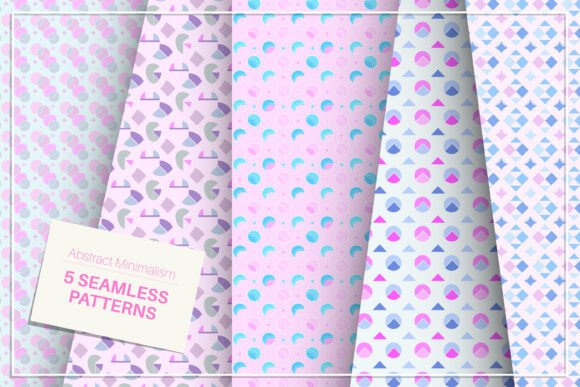
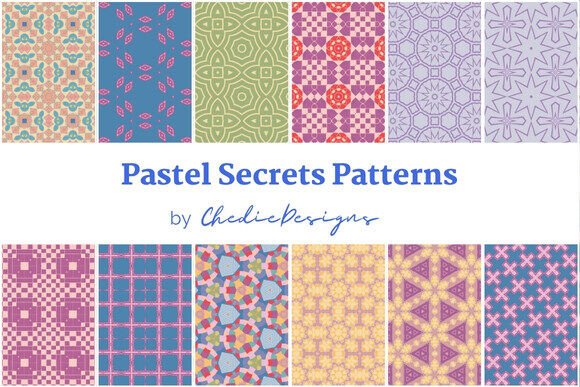
These patterns were generated from a digital illustration drawn with Procreate, titled Pastel Secrets. The collection includes 12 seamless patterns in JPEG format at 300 DPI, sized at 3000x3000px. While the technical specifications are straightforward, the real value lies in understanding how to leverage these assets effectively. Many creators jump straight into downloading files without considering resolution requirements, licensing implications, or color profile compatibility. Avoiding these common pitfalls ensures that your final output looks as polished digitally as it does in print.
Understanding Resolution and Print Readiness
One of the most frequent mistakes beginners make when purchasing surface patterns is ignoring the relationship between file size, resolution, and intended use. A common misconception is that any high-resolution image will look good on any material. However, the quality of your final product depends heavily on whether the pattern can tile seamlessly without visible gaps or distortion.
The Pastel Secrets Surface Patterns come prepared at 300 DPI (dots per inch), which is the industry standard for high-quality printing. At 3000x3000 pixels, these files offer significant flexibility. For context, this resolution allows you to print a single tile at roughly 10x10 inches with perfect clarity. If you are creating wrapping paper, decorative paper, or printed fabrics, you need the pattern to repeat flawlessly across larger surfaces. Because these are seamless patterns, they are designed specifically for this purpose, but users must ensure their printing software supports tiling correctly.
To avoid blurry or pixelated results, always check the dimensions against your target medium. If you plan to use these patterns for web backgrounds or blog headers, you might not need the full 3000px width, but keeping the original high-res files allows you to scale down later without losing quality. Never upscale a low-resolution image expecting it to match the crispness of a 300 DPI source.
Color Profiles and Screen vs. Print Discrepancies
Another area where many projects falter is color management. Digital illustrations created in apps like Procreate typically exist in the RGB color space, which is optimized for screens. However, physical products like packaging, wedding invitations, and fabric prints require CMYK color profiles to reproduce colors accurately on paper and textile substrates.
While the JPEG files provided are ready for immediate use, it is crucial to understand that what you see on your monitor may not exactly match the final printed result. Pastel tones, by their nature, are subtle and light. In digital formats, they appear soft and airy. When printed, especially on uncoated paper or certain fabrics, pastels can sometimes appear duller or shift slightly in hue if not managed properly.
Practical Advice: Before committing to a large print run for party decorations or commercial packaging, order a physical proof. Check how the pastel shades interact with the material’s texture. If you are designing for a brand, ensure your printer provides a CMYK conversion or offers spot color options if precise brand matching is required. Ignoring this step can lead to costly reprints and disappointed clients who expected vibrant pastels but received muted grays.
Versatility Across Mediums
The strength of the Pastel Secrets collection lies in its adaptability. With 12 distinct variations, you have enough variety to maintain visual interest across different projects while maintaining a cohesive aesthetic. Here is how different user groups can apply these patterns effectively:
- Small Business Owners & Entrepreneurs: Use these patterns for custom packaging inserts, branded tape, or product labels. The seamless nature means you can wrap boxes of any size without awkward cuts disrupting the design. This attention to detail enhances perceived value and encourages social media sharing.
- Wedding Planners & Event Designers: Create cohesive stationery suites. The patterns work beautifully for invitation backs, menu cards, and table numbers. They also serve as excellent digital backgrounds for virtual event invitations or live-stream overlays.
- Bloggers & Content Creators: Differentiate your site with unique header images or sidebar accents. Instead of using generic stock photos, a custom pastel pattern adds personality and brand recognition. Ensure the contrast is sufficient so text remains readable over the background.
- Hobbyists & Scrapbookers: These 3000x3000px files are ideal for home printing. You can create custom journaling cards, page borders, or even printable stickers. The high resolution ensures that intricate details in the Procreate illustration remain sharp even when cropped.
Evaluating Licensing and Usage Rights
Before integrating these patterns into commercial products, it is essential to review the specific license terms associated with the purchase. A common misunderstanding is assuming that buying a digital file grants unlimited commercial rights. Some licenses restrict usage to personal projects only, while others allow commercial use but prohibit resale of the raw digital file itself.
For instance, if you are a freelancer creating a website for a client, you likely have the right to embed the pattern in the final design. However, if you intend to sell the pattern itself as part of a bundle or template pack, you may need an extended license. Always clarify these boundaries to protect yourself from legal issues and to respect the illustrator’s intellectual property.
Best Practices for Implementation
To get the most out of Pastel Secrets Surface Patterns, follow these practical steps during your workflow:
- Organize Your Assets: Keep the original 300 DPI files in a dedicated folder. Create subfolders for different project types (e.g., "Print," "Web," "Social Media") and save resized versions there to preserve the originals.
- Test Tiling Early: In your design software, set up a document that mimics the final product size. Apply the pattern and zoom out to check for seams. Most modern design tools have a "pattern fill" feature that handles this automatically, but manual verification prevents errors.
- Consider Contrast: Pastel designs are visually calming. If you are placing text over these patterns, use solid blocks of color behind the text or choose a font color that contrasts sharply with the background. Avoid placing dark text on light pastel areas unless the typography is bold and clear.
- Maintain Consistency: If you are using multiple patterns from the set, ensure they share a similar visual weight. Mixing a dense pattern with a very sparse one can create visual clutter. Stick to one or two primary patterns per project for a cleaner, more professional look.
Conclusion
The difference between a amateur-looking project and a professional-grade deliverable often comes down to the smallest details—like the texture of the paper or the alignment of a background pattern. Pastel Secrets Surface Patterns offers a versatile, high-quality solution for anyone looking to add a touch of elegance and cohesion to their work. By paying attention to resolution, color profiles, and licensing, you can avoid common pitfalls and focus on what matters most: creating beautiful, meaningful content. Whether you are decorating a wedding venue, launching a new product, or simply enhancing your blog, these seamless patterns provide a reliable foundation for your creative vision.