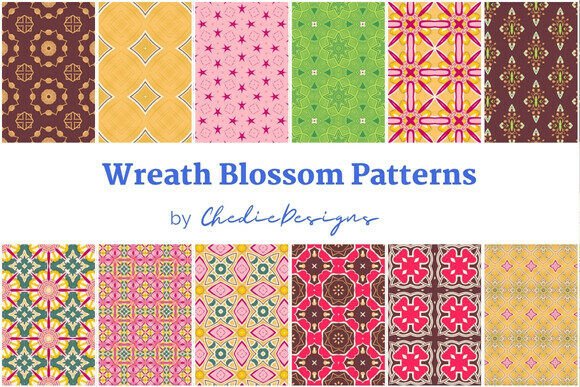
Wreath Blossom Surface Patterns
When you are looking to elevate a project with a touch of elegance and natural beauty, Wreath Blossom Surface Patterns offers a sophisticated solution. These patterns were generated from a digital illustration drawn with Procreate, titled Wreath Blossom, resulting in a collection that balances organic charm with professional polish. For creators, entrepreneurs, and hobbyists alike, having access to high-quality, seamless designs is not just a convenience—it is a necessity for maintaining brand consistency and visual appeal.
The package includes 12 seamless patterns in JPEG format at 300 DPI, with each image sized at 3000x3000px. This resolution is critical because it ensures that whether you are printing on fabric, creating a wedding invitation, or designing a web background, the image remains crisp and clear. However, simply downloading these files is only the first step. To truly leverage the potential of Wreath Blossom Surface Patterns, one must understand how to apply them correctly and avoid common pitfalls that can undermine even the most beautiful design.
Understanding Seamless Pattern Application
A frequent misunderstanding among beginners is assuming that a "seamless" pattern will automatically tile perfectly without any adjustment. While the files provided are designed to be seamless, the context in which you use them matters immensely. If you are using these patterns for wrapping paper or decorative paper, the scale of the pattern relative to the size of your product is crucial. A pattern that looks balanced on a small scrapbooking page might look cluttered or overwhelming when scaled up for a large gift box.
Pro Tip: Always preview your pattern at its intended final size before committing to production. Use software like Adobe Illustrator or even free alternatives to create a mockup. This allows you to see if the repetition points align naturally and if the density of the blossoms fits the aesthetic you are aiming for. Ignoring this step can lead to wasted materials and frustrated customers who perceive the design as amateurish due to poor scaling.
Resolution Matters More Than You Think
The inclusion of 300 DPI (dots per inch) in the Wreath Blossom Surface Patterns file specifications is a significant advantage for print projects. Many users make the mistake of using low-resolution images for print, resulting in pixelation or blurriness. Conversely, some professionals mistakenly believe that higher resolution always equals better quality, leading to unnecessarily large file sizes that slow down workflow without visible benefit.
For digital uses, such as blog backgrounds or web interfaces, a lower resolution (typically 72 DPI) is often sufficient and helps improve page load times. However, since the Wreath Blossom files are provided at 300 DPI, you have the flexibility to use them for both digital and high-quality print applications. Just remember to downsample the images for web use to maintain site performance. Failing to optimize file sizes for digital platforms can hurt your SEO rankings and user experience, as visitors are unlikely to wait for heavy images to load.
Choosing the Right Application for Your Needs
The versatility of these 12 patterns means they can be applied across a wide range of mediums. From packaging and wrapping paper to printed fabrics and party decorations, the options are extensive. However, not every application requires the same level of detail. Here is how different audiences can best utilize these resources:
- Small Business Owners: If you are launching a new line of branded packaging, Wreath Blossom Surface Patterns can provide a cohesive look across all your products. Ensure that the color profile matches your printer’s requirements (CMYK vs. RGB) to avoid unexpected color shifts.
- Event Planners and Wedding Designers: These patterns are ideal for creating custom stationery, backdrops, and table settings. The floral theme lends itself well to romantic and elegant themes. Be mindful of lighting conditions; colors may appear differently under various light sources, so always test prints in the actual venue lighting if possible.
- Fashion and Textile Designers: When applying these patterns to fabric, consider the weave and texture of the material. A smooth satin will render the delicate Procreate details differently than a rough linen. It is advisable to create a sample swatch to check how the pattern repeats over the grain of the fabric.
- Blogger and Content Creators: Use these patterns as headers, sidebars, or featured images. They add a professional touch to your content without distracting from the text. Remember to compress the images appropriately for web use to ensure fast loading speeds.
Common Mistakes to Avoid
Even with high-quality assets, errors in execution can detract from the final result. One common mistake is ignoring the aspect ratio. If you stretch a square 3000x3000px image to fit a rectangular banner without adjusting the crop, the blossoms may appear distorted. Always maintain the original proportions or use clipping masks to preserve the integrity of the design.
Another oversight is neglecting to check the licensing terms. While the description highlights the usability for various commercial and personal projects, it is essential to verify if attribution is required or if there are restrictions on resale. Misunderstanding these terms can lead to legal issues, especially for entrepreneurs selling physical goods. Always read the fine print to ensure compliance.
Color Consistency Across Mediums
Transitioning from screen to print is where many designers face challenges. The vibrant colors seen on a Procreate canvas or a computer monitor may not translate directly to physical media due to differences in color spaces. RGB colors, used for screens, are brighter and more saturated than CMYK colors, used for printing. Before finalizing any print run, convert your Wreath Blossom Surface Patterns to CMYK and proof the output. This step prevents the disappointment of dull or shifted colors in the final product.
Evaluating Quality and Usability
When evaluating surface patterns for purchase or use, consider the following checklist to ensure you are making a sound decision:
- Seamlessness Test: Tile the pattern multiple times to ensure there are no visible seams or breaks in the design.
- Resolution Check: Verify that the DPI is appropriate for your intended use. For print, 300 DPI is standard; for web, ensure the file size is optimized.
- Color Profile: Confirm whether the files are in RGB or CMYK, and convert accordingly for your specific needs.
- Scalability: Test the pattern at different scales to ensure it remains visually appealing whether enlarged for a wall mural or reduced for a business card.
- Licensing Clarity: Understand the rights associated with the patterns, including commercial use, modification, and distribution.
By keeping these factors in mind, you can maximize the value of Wreath Blossom Surface Patterns. These 12 seamless designs offer a versatile toolkit for enhancing your creative projects. Whether you are crafting personalized gifts, designing marketing materials, or developing a brand identity, attention to detail in application will set your work apart. Embrace the quality of the Procreate-generated illustrations, but pair it with technical precision to achieve professional results. With careful planning and execution, these patterns can become a cornerstone of your visual storytelling, adding a layer of sophistication and charm that resonates with your audience.
Ultimately, the success of using Wreath Blossom Surface Patterns lies not just in the asset itself, but in how thoughtfully you integrate it into your workflow. By avoiding common pitfalls and leveraging the high-resolution, seamless nature of the files, you can create stunning visuals that stand out in a crowded marketplace. Take the time to experiment, test, and refine, and you will find that these patterns are a valuable addition to any creator’s repertoire.