Evaluating Vintage Retro Geometrical Patterns: A Practical Guide to Design Assets
In the realm of graphic design, visual trends often cycle back with renewed vigor, but few styles possess the enduring versatility and structural clarity of Vintage Retro Geometrical Patterns. For designers, illustrators, and creative directors working on projects ranging from packaging and branding to interior textiles, finding the right texture is often more critical than selecting a primary color palette. These patterns offer a unique intersection of mid-century modernism, art deco elegance, and 1970s organic geometry, providing a sophisticated backdrop that feels both nostalgic and contemporary.
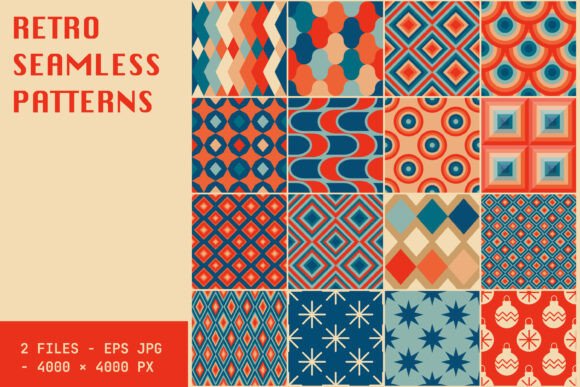
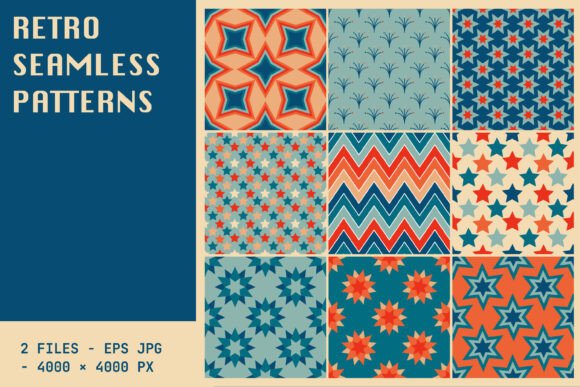
When sourcing high-quality assets, specifications matter immensely. The distinction between a low-resolution web image and a print-ready file can make or break a professional project. This evaluation focuses specifically on assets defined by their resolution and format: 4000 x 4000 px at 300 dpi in EPS and JPG formats. Understanding why these technical specifications are crucial for working with retro geometrics will help you choose resources that meet your production needs without compromising quality.
Defining the Aesthetic: What Makes Retro Geometry Distinct?
Before diving into technical comparisons, it is essential to understand what constitutes a "Vintage Retro Geometrical Pattern" in a modern context. Unlike chaotic abstract art or purely organic shapes, retro geometry relies on mathematical precision, repetition, and symmetry. These designs often draw inspiration from specific eras:
- Mid-Century Modern (1950s–60s): Characterized by clean lines, atomic motifs, and starbursts. These patterns feel optimistic and structured.
- Art Deco (1920s–30s): Features bold contrasts, fan shapes, and sunburst rays, conveying luxury and glamour.
- 1970s Groove: Incorporates wavy lines, checkerboards, and muted earth tones, offering a more relaxed, psychedelic vibe.
The strength of these patterns lies in their ability to add depth without overwhelming the primary subject. Whether used as a background for a minimalist logo or as a full-bleed texture for a magazine spread, retro geometry provides a framework that guides the eye while maintaining visual interest.
Technical Specifications: Why 4000 x 4000 px and 300 DPI Matter
For professionals evaluating design assets, the pixel dimensions and dots per inch (DPI) are not just numbers; they dictate the physical applicability of the pattern. A standard asset specification of 4000 x 4000 pixels at 300 DPI offers a robust solution for most commercial printing needs.
Print Readiness and Resolution
At 300 DPI, an image is considered high-resolution for print. To calculate the physical size this asset supports, we divide the pixel dimension by the DPI. In this case, 4000 pixels divided by 300 DPI equals approximately 13.3 inches. This means a single tile or seamless pattern of this size can be printed clearly up to 13.3 x 13.3 inches without visible pixelation.
This is particularly important for retro geometrical patterns because they rely on sharp edges and precise intersections. If a pattern is downsampled to 72 DPI (standard for web), the crisp lines of a geometric shape may appear jagged or blurry when scaled up for a poster, business card, or fabric swatch. By choosing assets that start at 4000 x 4000 px, designers ensure that even if they need to scale the pattern larger for a banner or billboard, they have sufficient data to maintain integrity, especially if the pattern is tiled seamlessly.
The Advantage of Vector Formats (EPS)
While JPG is ubiquitous, the inclusion of EPS (Encapsulated PostScript) files is a significant differentiator for retro geometric designs. EPS files are vector-based, meaning they are constructed using mathematical equations rather than pixels.
- Infinite Scalability: Unlike JPGs, which lose quality when enlarged, EPS files can be scaled to any size—from a favicon to a building wrap—without any loss of sharpness. This is ideal for geometric patterns where line weight and precision are paramount.
- Editability: With an EPS file, you can often edit individual elements, change colors, or adjust stroke widths within Adobe Illustrator or similar software. This allows for customization, enabling you to tweak a vintage orange hue to match a specific brand guideline.
- Note: Not all EPS files contain editable paths; some are embedded raster images. Always verify the source to ensure true vector capability.
Comparing Formats: JPG vs. EPS for Retro Patterns
When deciding between JPG and EPS versions of the same pattern, the choice depends largely on your workflow and end use. Both formats serve distinct purposes in the design process.
JPG: Speed and Compatibility
JPG files are raster images compressed to reduce file size. They are universally compatible across all operating systems, web browsers, and design software. For quick mockups, web backgrounds, or social media graphics, a 4000 x 4000 px JPG is highly efficient.
Best Use Cases:
- Web design and digital marketing materials.
- Quick client presentations where editing is not required.
- Projects where file transfer speed is a priority.
Limitations: JPGs use lossy compression, which can introduce artifacts around high-contrast geometric edges. Furthermore, once saved, the image cannot be edited structurally. If you need to rotate the pattern or change its opacity significantly, the raster nature limits flexibility compared to vectors.
EPS: Precision and Production
As mentioned, EPS files offer superior quality for print and branding. They are the industry standard for logos and complex illustrations that require precise reproduction.
Best Use Cases:
- High-end packaging design.
- Textile printing where color separation is critical.
- Large-format signage and banners.
- Brand identity kits requiring scalable elements.
Limitations: EPS files can be larger in storage size (though smaller than uncompressed TIFFs) and may require specific software to open and edit. They are generally overkill for simple web-only projects.
Evaluating Alternatives and Tradeoffs
If a 4000 x 4000 px 300 DPI asset does not fit your budget or technical requirements, several alternatives exist. However, each comes with tradeoffs that affect the final output quality.
Lower Resolution Rasters (72 DPI)
Many free or low-cost stock sites offer patterns at 72 DPI. While suitable for screen viewing, these assets fail completely in print scenarios. If you plan to print even a small business card at 300 DPI, a 72 DPI source will result in a blurry, pixelated mess. Decision Factor: If your project is digital-only, lower resolutions are acceptable. For any physical product, stick to 300 DPI or higher.
Seamless Tile Loops vs. Large Single Images
Sometimes, assets are sold as small "seamless tiles" (e.g., 500 x 500 px) intended to be repeated in software like Photoshop or Illustrator. While this approach saves file size, it places the burden of tiling on the designer. If the tile alignment is imperfect, visible seams may appear in large prints. A pre-made 4000 x 4000 px seamless pattern eliminates this risk, ensuring that the geometry flows naturally across large surfaces without manual adjustment.
Photorealistic Textures vs. Flat Graphics
Retro geometry is often confused with textured overlays (like paper grain or noise). While combining a flat geometric vector with a subtle texture can add warmth, relying solely on a photorealistic texture for geometry can muddy the clean lines that define the style. Pure vector EPS geometries allow for crisp, unadulterated shapes, whereas raster textures can obscure detail. Recommendation: Choose pure vector geometries for maximum versatility, adding texture later in post-production if desired.
When to Choose Vintage Retro Geometrical Patterns
Determining whether this specific aesthetic fits your project requires looking at the emotional tone and historical context you wish to convey.
Ideal Scenarios
- Branding for Creative Industries: Architecture firms, boutique hotels, and artisanal food brands often use retro geometry to signal craftsmanship, heritage, and attention to detail.
- Editorial Design: Magazines and newsletters benefit from the rhythmic structure of geometric patterns to break up text-heavy layouts without distracting from the content.
- Packaging: On retail shelves, the repetitive nature of a geometric pattern creates a strong visual block that draws the eye from a distance.
When to Avoid
Retro geometry may not be suitable for projects requiring a futuristic, tech-forward, or minimalist corporate look. It carries inherent cultural associations with the past. If your brand aims to project innovation through sleekness and simplicity (think Apple or Tesla), a busy geometric pattern might clash with the desired message of modernity. Similarly, for children’s products targeting toddlers, overly complex geometric arrangements might lack the playful, soft appeal associated with age-appropriate design.
Final Considerations for Decision Making
Selecting the right design asset is a balance of aesthetic preference and technical necessity. When evaluating options for Vintage Retro Geometrical Patterns, prioritize assets that offer both high-resolution rasters (JPG) and scalable vectors (EPS). The 4000 x 4000 px size at 300 DPI strikes an optimal balance between file manageability and print utility.
Always test your chosen pattern by scaling it up and down. Check the corners and edges for alignment issues. Ensure that the color palette provided in the EPS file matches your brand guidelines or can be easily adjusted. By focusing on these practical details, you ensure that the nostalgic charm of retro geometry enhances your project rather than detracting from its professionalism.
Ultimately, the best choice is the one that aligns with your output medium. For digital campaigns, a high-quality JPG suffices. For tangible products, branding materials, and large-scale displays, investing in the EPS version ensures that every line remains sharp, every angle precise, and every pattern repeat flawless. This dual-format availability is a hallmark of professional-grade design resources, offering the flexibility needed to navigate diverse creative challenges.